Author: Sarah O'Keefe

Structured content

Strategy < tactics < execution

I read Execution: The Discipline of Getting Things Done several years ago, and much of this post is based on the information in that book. 

Because of a Series of Troublesome Committees, I find myself thinking about three big-picture concepts: strategy, tactics, and execution:

  • Strategy is the overall plan. For example, one strategy for getting new projects at Scriptorium is to establish ourselves as experts in our chosen field.
  • Tactics are specific actions to achieve the plan. Our tactics include writing articles and delivering conference presentations that buttress our claim of expertise.
  • Execution is what happens after you pick a strategy and develop some tactics. That’s when we write the articles and attend the conferences.

Each of these stages is a prerequisite for the other. That is, you start by developing a strategy and can then pick your tactics. Finally, you have to execute on the plan.

You can fail at every point in the process:

  • Choose the wrong strategy, and not much else matters. Great tactics and excellent execution will not rescue you if you have chosen the wrong approach.
  • If you have the right strategy, but the wrong tactics, you may have some limited success, but poor tactics will work against you.
  • Worst of all, though, is bad execution. You pick the right strategy and the right tactics, and then sabotage the whole thing with poor follow-through or lousy performance. For example, writing an article full of bad grammar or delivering a boring, technically inaccurate presentation would be bad execution for us.

At every stage, you face constraints. For instance, if your budget is limited, you might not be able to justify the most expensive tactic, even though it might have been the most effective. But once you work through your constraints and choose your tactics, there’s really no excuse for doing those activities badly.

Some things to keep in mind when working with technical communicators:

  • Forget the spin. Exorcising marketing and PR messages from technical content is a core job skill for many of us. Simple, honest, and straightforward messages are better. If you try to spin your message, expect a scornful response.
  • Language matters. Writers become writers because they care about language. If you want their respect, you need to show that you also care about language. At a minimum, grammar and mechanics need to be accurate. If you can go beyond the basics and demonstrate graceful writing, you will score bonus points.

Read More
DITA DITA XML—authors

XML 101

My latest XML Strategist article, “The ABCs of XML,” is available as a PDF file (144K). This article was originally published in the September/October 2009 issue of Intercom.

The technical side of XML is not much more difficult than HTML; if you can handle a few HTML angle brackets you can learn XML. […] If […] you don’t like using styles and
prefer to format everything as you go, you are going to loathe structured authoring. 

Just trying to make sure that there are no surprises. The article itself is a very basic introduction to the principles that make XML important for technical communication: automation, baseline architecture (sorry…I had problems with B), and consistency.

Read More
DITA DITA XML—authors

A strident defense of mediocre formatting

In addition to a gratuitous (and entertaining) swipe at “noisome” DITA “fanboys,” Roger Hart argues that we need to reconsider the disadvantages of automated formatting:

The thing is, [separation of content and formatting has] all been taken rather stridently to heart in certain quarters, leading to a knee jerk reaction whenever author-controlled formatting/pagination/lineation is mentioned as anything other than bleak, sulphurous devilry. This is twaddle. […]

Uncertainty in meaning is anathema to user intelligibility. If we’re going to make sure we’re not writing poetry, there’s definitely value in having poetry’s level of control over semantic blocks.

Of course, it’s fully possible that this is an expensive distraction.

Possible? It’s definitely expensive. It’s possible that it’s a distraction.

I think Hart perhaps unintentionally put his finger on the real issue: value. How much value (in the form of improved comprehension) is added to a technical document when you are able, in the words of commenter Brian Harris, to “lovingly handcraft” each page?

How much value (in the form of cost avoidance) is added to an organization when you are able to spit out a reasonably formatted document in a few minutes?

Actually, I have a different question. How far should we take this argument? Here’s an example of the pinnacle of handcrafting:

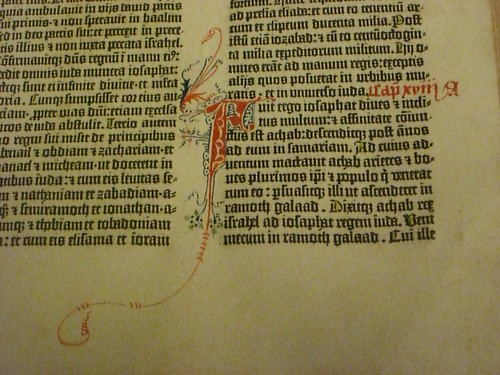
Book of Kells image
Can we all agree that this might perhaps take handcrafting a little too far?

Compared to the Book of Kells (above), the Gutenberg Bible looks quite pedestrian:

Gutenberg Bible image

You can just imagine the scribes with their quills, lapis, gold leaf, and other implements muttering, “That Gutenberg and his noisome fanboys. He can’t even render two colors without our help. Poser. It’ll never last.”

Formatting automation removes cost from the process of creating and delivering content. For technical documents that change often and are perhaps delivered in multiple languages, it removes a lot of cost. Let’s assume that handcrafted pages can improve ease of reading and comprehension with careful copy-fitting and adjusted spacing (Hart’s article mentions “headings, line breaks, intra-word, etc”). This increases the cost of the content.

What happens when content is expensive? Fewer people get to see it.

Books in Europe went from 50000 before Gutenberg to 12 million 50 years later.

I think we can all agree that e-books offer none of the typographic sophistication in question here. Bill Gates (yes, that Bill Gates) wrote in 1999:

It is hard to imagine today, but one of the greatest contributions of e-books may eventually be in improving literacy and education in less-developed countries. Today people in poor countries cannot afford to buy books and rarely have access to a library. 

Essentially, we can produce documents inexpensively and give more people access to them as a direct result of lower cost, or we can climb on our typographic high horse and whine about word spacing.

I’m with the noisome fanboys.

Read More
Industry insights

Liberated type

(or should that be “Liberated typoes?”)

We have opened up free access to two of our white papers:

  • Hacking the DITA Open Toolkit, available in HTML or PDF (435 KB, 19 pages)
  • FrameMaker 8 and DITA Technical Reference, available in PDF (5 MB, 55 pages)

These used to be paid downloads.

Why the change of heart? Most of our business is consulting. To get consulting, we have to show competence. These white papers are one way to demonstrate our technical expertise.

(By this logic, our webcasts should also be free, but I’m not ready to go there. Why? We have fixed costs associated with the webcast hosting platform. Plus, once we schedule a webcast, we have to deliver it at the scheduled time, even if we’d rather be doing paying work. By contrast, we can squeeze in white paper development at our convenience.)

What are your thoughts? We are obviously not the only organization dealing with this issue…

Read More
Industry insights

Is this thing on?

If you are reading this, then we have succeeded in migrating our web site over to WordPress.

Of course, the process of managing our own content always takes a back seat to working with our customers’ content, so the process took longer than you might expect. 

We did learn a couple of things, most of which should sound awfully familiar if you are working on your own content strategy:

  • It’s not until you try to move into a new system that you recognize all the mistakes you made the previous system.
  • PHP stands for Picky Hypochondriac Programming. I had several cases where code absolutely refused to work for no apparent reason. I had the resident PHP expert (Simon) look it over. Eventually, I gave up and retyped the code, and then it worked.
  • Learn to work with the tool and not against it. I have to credit a former coworker, Bruce Bicknell, for this little gem, which he originally applied to Word versus FrameMaker. When moving from Dreamweaver-based HTML to WordPress, take some time to learn best practices for WordPress. Don’t try to impose your existing  Way of Doing Things onto the new system. It’s inefficient and it probably won’t work.
  • Content migration is always awful. To transfer our blog, I found a blogger-to-WordPress converter. That worked pretty well, except that a couple of posts now have my name on them even though I didn’t write them. Transferring comments was a travesty that involved the support people at Haloscan (helpful) and cleaning out random comment triplication (gross manual labor).

But I hope you like the new site and blog. Please poke around and leave us feedback.

Read More
Webinar

Learn DITA and XML at your desk

For August and September, our webinar schedule is as follows:
DITA 101, August 18 at 11 a.m. Eastern time
Participants will learn about basic Darwin Information Typing Architecture (DITA) concepts, the business case for implementing DITA, and some typical uses of DITA. This webinar is ideal for those who are considering a move to structured authoring based on the DITA standard. Register
Demystifying DITA to PDF Publishing, September 10 at 11 a.m. Eastern time
When a company implements a DITA-based workflow, the most difficult technical obstacle is often setting up a PDF/print publishing workflow. This session discusses the advantages and disadvantages of using the DITA Open Toolkit, FrameMaker, InDesign, and other options to create PDF output from DITA content. Basic familiarity with DITA, Extensible Markup Language (XML), and related technologies is helpful but not required. Register
What Do Movable Type and XML Have in Common?, September 22 at 11 a.m. Eastern time
The invention of movable type changed the economics of information by making the process of copying a book by hand obsolete. More than 500 years later, XML seems to be doing the same to desktop publishing. But where movable type changed the economics of a mechanical process—creating printed 
copies—XML changes the economics of content authoring, formatting, and customization. This webinar takes a look at how publishing technologies revolutionize the way people consume information and how those technologies affect authors. Register
Each webinar is $20. 
During the sessions, you can interact with the presenter and other students through the chat interface or the audio connection. There is a question-and-answer session at the end of each webinar. The Q&A is not included in session recordings, which are available for download later. Participants in the sessions receive a free recording.
To register for these webcasts, or to purchase recordings of past webinars, go to our online store.

Read More
Industry insights

Let the conversation begin

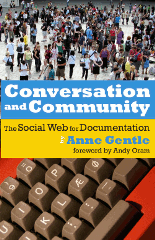
Conversation and Community book cover imageConversation and Community: The Social Web for Documentation (XML Press, ISBN: 9780982219119) by Anne Gentle provides technical communicators with a roadmap for integrating social media — blogs, wikis, and much more — into their content development efforts. This is critical because, as Anne notes in the preface, “professional writers now have the tools to collaborate with their audience easily for the first time in history.”
Anne provides overviews of all the major social media concepts — from aggregation to syndication, wikis, discussion, presence, and much more. But it is Chapter 3, “Defining a Writer’s Role with the Social Web,” that will make this book a classic. Here, Anne lays out a detailed strategy for determining whether and how to introduce social media in an organization. Consider this:

It’s important to find a balance between allowing an individual’s authentic voice to speak on behalf of an organization and the requirements of institutional messaging and brand preservation. […] It’s also possible that you are ahead of the curve and need to help others see ways to apply social technologies for the company.

She goes on to explain just how to accomplish these things.
Wikis and blogs each get a chapter of their own, in which Anne discusses how to start and maintain these types of environments.
After reading so much of Anne’s work on her blog, it’s a bit odd to see her writing on paper in an actual book. The feeling that I’ve wandered into the wrong medium is augmented by extensive footnotes, most of which point to web site resources, and the many examples of web-based content (such as videos or interactive mashups). However, it’s likely that the book’s target audience is more comfortable with paper.
Conversation and Community: The Social Web for Documentation provides an excellent introduction to wikis, blogs, forums, and numerous other social media technologies for the professional content creator. There is valuable (and perhaps career-preserving) information about how to develop a strategy for user-generated content that is compatible with your organization’s corporate culture.
If you think that community participation in your documentation is coming soon, read this book immediately. If you think that it’s not coming, you’re wrong, and you especially need to read this book.
Resources:
[Disclosure: I reviewed an early draft of this book. I have met Anne in person a few times and we have ongoing email and blog correspondence.]

Read More
Structured content

Authoring tools do matter

“I can write in anything.”
“The tool doesn’t matter.”
“I can learn any new tool.”

Most of the time, I agree. But then, there are the exceptions.

One of our customers is using FrameMaker to produce content that is delivered in HTML. (They use structured FrameMaker, generate XML, and then transform via XSLT into HTML.) Their rationale for using FrameMaker was:

  • The project was on an extreme deadline.
  • The writers already knew FrameMaker.
  • FrameMaker is already installed on the writers’ systems.

All valid points.

But.

We have had a continuous stream of requests from the writers to make adjustments to the FrameMaker formatting. Things like “the bullets seem a little too far from the text; can you move them over?”

FrameMaker is being used as an authoring tool only. FrameMaker formatting is discarded on export; HTML formatting is controlled mainly by CSS. However, even after repeated explanations, we continue to receive requests to modify the FrameMaker formatting.

In this specific case, the authoring tool does matter. Writers are focusing on the wrong set of issues (leading, kerning, print formatting), none of which is actually relevant for the output.

Why are they focused on this stuff? Because they can. It seems to me that moving authors to a WYSIOO (what you see is one option) tool, such as oXygen or XMetaL, instead of a WYSIWYG tool (FrameMaker) would eliminate the obsession with irrelevant formatting.

Read More
Webinar

Summer webinar theme: Avoiding extinction

Ellis Pratt of Cherryleaf is delivering Beyond Documentation this Thursday, July 9th, at 11 a.m. Eastern (US) time. Ellis gave a similar presentation in Vienna, which was the basis for Tom Johnson’s post, How to Avoid Extinction as a Technical Communicator, and led to a lively discussion in the comments. Join us to see if you agree with Ellis’s point of view.

In the category of “what’s old is new again,” we have Writing to STOP from Tony Self of HyperWrite in Australia.

STOP – Sequential Thematic Organisation of Publications – was developed at Hughes Corporation in the 1960s. The purpose of STOP was to improve the speed of document production, and to allow multiple authors to work simultaneously on the same document. […]
The STOP approach still resonates in the age of online documentation, as we still have the same needs to reduce document creation times and to work collaboratively. In this session, we will look at how the STOP approach worked, and how it might be re-applied even more effectively in the 21st century. 

That presentation is July 15 at 5 p.m. Eastern time. (Note the time change. Our usual 11 a.m. time slot is 1 a.m. in Melbourne, Australia. That seemed impolite to our presenter.)

Finally, Jack Molisani of Prospring and Lavacon is delivering How to Build a Business Case on August 4 at 11 a.m. Eastern time.

If you’ve ever submitted a purchase request that was not approved, chances are it lacked one or more of the vital components management looks for when allocating resources. 

In this segment, Jack Molisani will present a fun and practical session identifying the components of a successful business case, how to identify what is important to management, how to maximize your chances of approval, and more.

Jack usually rewards questions with chocolate, and I’m going to be impressed if he manages that in a webinar.

Don’t miss your chance to hear from these guys. You can register through our store; recordings of previous webcasts are now available as well.

PS Our presenters are based in England, California, and Australia. Registrants could be anywhere. The sessions are yours for $20. I love the Internet.

Read More
Structured content

This is the future of technical communication

First, read this article in the New York Times about the struggle to keep a reporter’s kidnapping quiet:

For seven months, The New York Times managed to keep out of the news the fact that one of its reporters, David Rohde, had been kidnapped by the Taliban. But that was pretty straightforward compared with keeping it off Wikipedia. 

Now, think about these issues as applied to technical communication. Let’s assume that your organization has online community — forums and a wiki, maybe. Technical communicators are responsible for monitoring and managing the community. Under what circumstances do you delete information? How do you respond when:

  • Information is inaccurate
  • Information is unflattering
  • Both

What if the information is accurate but incomplete?
What if someone describes a way of using your product that could cause injury, even though it’s technically possible? Do you delete the information? Do you add a comment warning of possible injury? What if the reader sees the original post but not the comment?

In the absence of safety concerns, I think that accuracy must win. Thus, as the information curator, you have a responsibility to correct inaccurate information. If the inaccuracy is truly dangerous, you may need to edit the post directly. Make sure that you disclosure what you’ve done with brackets. For example:

I like riding my scooter down mountains, especially without guardrails. Wheee! [This is a really bad idea because You Might Die. -moderator]

or

I like [really bad idea redacted by moderator]. Wheee!

Deleting unflattering (but accurate) information will probably backfire on the organization. Instead of censoring negative content, try addressing the concern being identified. Think of an impolite forum post as customer feedback. Does the poster have a valid point? Can you fix the problem that’s been identified?

I hate your scooters. They don’t come in enough colors. And they suck. 

What colors would you like to see? We do have two dozen available, see this list.
– Joe in TechComm

The life-or-death issues around Mr. Rohde’s kidnapping are relatively straightforward. We are likely to have much more difficult judgment calls in typical technical communication. Imagine, for example, that information were being suppressed because it criticized security arrangements and not because of safety concerns for the reporter. In that case, I think we can agree that Wikipedia’s response would have (and should have) been different. What would an equivalent scenario look like in your organization?

Read More