Dita xml—authors

Change management DITA DITA XML—authors Structured content

Anyone can write

This article was originally published in STC Intercom in September/October of 2010.

“Anyone can write.” How many times have you heard that tired cliché? And how did it ascend to a cliché? It’s pretty clear to me that most people are terrible writers. When someone says, “Anyone can write,” they actually mean, “Our writing standards are so low that anyone can meet them.”

Read More
DITA DITA XML—authors

XML: The death of creativity in technical writing?

Originally published in STC Intercom, February 2010.

I spend a lot of time giving presentations on XML, structured authoring, and related technologies. The most common negative reaction, varied only in the level of hostility, is “Why are you stifling my creativity?”

Does XML really mean the Death of Creativity for technical communicators? And does creativity even belong in technical content?

Read More
DITA DITA XML—authors

Handling XSL:FO’s memory issue with large page counts

Formatting Object (FO) processors (FOP, in particular) often fail with memory errors when processing very large documents for PDF output. Typically in XSL:FO, the body of a document is contained in a single fo:page-sequence element. When FO documents are converted to PDF output, the FO processor holds an entire fo:page-sequence in memory to perform pagination adjustments over the span of the sequence. Very large page counts can result in memory overflows or Java heap space errors.

Read More
DITA DITA XML—authors

XML 101

My latest XML Strategist article, “The ABCs of XML,” is available as a PDF file (144K). This article was originally published in the September/October 2009 issue of Intercom.

The technical side of XML is not much more difficult than HTML; if you can handle a few HTML angle brackets you can learn XML. […] If […] you don’t like using styles and
prefer to format everything as you go, you are going to loathe structured authoring. 

Just trying to make sure that there are no surprises. The article itself is a very basic introduction to the principles that make XML important for technical communication: automation, baseline architecture (sorry…I had problems with B), and consistency.

Read More
DITA DITA XML—authors

A strident defense of mediocre formatting

In addition to a gratuitous (and entertaining) swipe at “noisome” DITA “fanboys,” Roger Hart argues that we need to reconsider the disadvantages of automated formatting:

The thing is, [separation of content and formatting has] all been taken rather stridently to heart in certain quarters, leading to a knee jerk reaction whenever author-controlled formatting/pagination/lineation is mentioned as anything other than bleak, sulphurous devilry. This is twaddle. […]

Uncertainty in meaning is anathema to user intelligibility. If we’re going to make sure we’re not writing poetry, there’s definitely value in having poetry’s level of control over semantic blocks.

Of course, it’s fully possible that this is an expensive distraction.

Possible? It’s definitely expensive. It’s possible that it’s a distraction.

I think Hart perhaps unintentionally put his finger on the real issue: value. How much value (in the form of improved comprehension) is added to a technical document when you are able, in the words of commenter Brian Harris, to “lovingly handcraft” each page?

How much value (in the form of cost avoidance) is added to an organization when you are able to spit out a reasonably formatted document in a few minutes?

Actually, I have a different question. How far should we take this argument? Here’s an example of the pinnacle of handcrafting:

Book of Kells image
Can we all agree that this might perhaps take handcrafting a little too far?

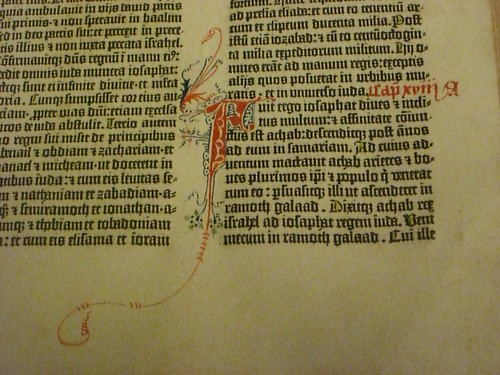
Compared to the Book of Kells (above), the Gutenberg Bible looks quite pedestrian:

Gutenberg Bible image

You can just imagine the scribes with their quills, lapis, gold leaf, and other implements muttering, “That Gutenberg and his noisome fanboys. He can’t even render two colors without our help. Poser. It’ll never last.”

Formatting automation removes cost from the process of creating and delivering content. For technical documents that change often and are perhaps delivered in multiple languages, it removes a lot of cost. Let’s assume that handcrafted pages can improve ease of reading and comprehension with careful copy-fitting and adjusted spacing (Hart’s article mentions “headings, line breaks, intra-word, etc”). This increases the cost of the content.

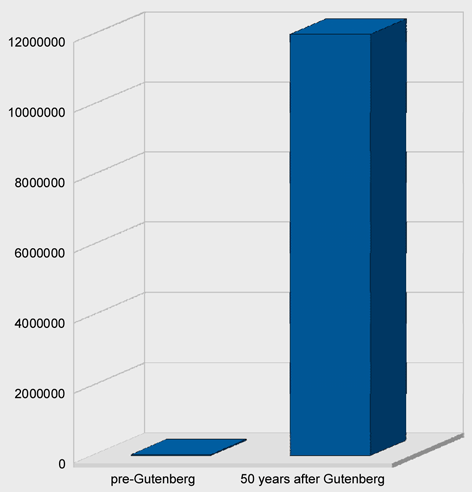
What happens when content is expensive? Fewer people get to see it.

Books in Europe went from 50000 before Gutenberg to 12 million 50 years later.

I think we can all agree that e-books offer none of the typographic sophistication in question here. Bill Gates (yes, that Bill Gates) wrote in 1999:

It is hard to imagine today, but one of the greatest contributions of e-books may eventually be in improving literacy and education in less-developed countries. Today people in poor countries cannot afford to buy books and rarely have access to a library. 

Essentially, we can produce documents inexpensively and give more people access to them as a direct result of lower cost, or we can climb on our typographic high horse and whine about word spacing.

I’m with the noisome fanboys.

Read More
Content management DITA DITA XML—authors

Ignoring DOCTYPE in XSL Transforms using Saxon 9B

Recently I had to write some XSL transforms in which I wanted to ignore the DOCTYPE declarations in the source XML files. In one case, I didn’t have access to the DTD (and the files wouldn’t have validate even if I did). In the other case, the XML files were DITA files, but I had no need or interest in validating the files; I simply needed to run a transform that modified some character data in the files.

In the first case, I ended up writing a couple of SED scripts that removed and re-inserted the DOCTYPE declaration. By the time I encountered the second case, I wanted to do something less ham-fisted, so I started investigating how to direct Saxon to ignore the DOCTYPE declaration.

My first thought was to use the -x switch in Saxon. Perhaps I didn’t use it correctly, but I couldn’t get it to work. Even though I was using a non-validating parser (Piccolo), Saxon kept telling me that the DTD couldn’t be found.

I went back to the drawing board (aka Google) and found a note from Michael Kay that said, “to ignore the DTD completely, you need to use a catalog that redirects the DTD reference to some dummy DTD.” Michael provided a link to a very useful page in the Saxon Wiki that discussed using a catalog with Saxon. After a bit of experimentation, I got it working correctly. In this blog post, I’ve distilled the information to make it useful to others who need to ignore the DOCTYPE in their XSL.

Before I describe the catalog implementation, I’d like to point out a simple solution. This solution works best when a set of XML files are in a single directory and all files use the same DOCTYPE declaration in which the system ID specifies a file:

<!DOCTYPE topic PUBLIC "-//OASIS//DTD DITA Topic//EN" "topic.dtd">

In this case, you don’t need a catalog. It’s easier to create an empty file named “topic.dtd” (a dummy DTD) and save it in the same directory as the XML files. The XML parser looks first for the system ID; if it finds a DTD file, it uses it. Case closed.

However, there are many cases in which this simple solution doesn’t work. The system ID (“topic.dtd” in the previous example) might specify a path that cannot be reproduced on your machine…or the XML files could be spread across multiple directories…or there could be many different DOCTYPEs…or…

In these cases, it makes more sense to set up a catalog file. To specify a catalog with Saxon, you must use the XML Commons Resolver from Apache (resolver.jar). You can download the resolver from SourceForge. The good thing is, if you have the DITA Open Toolkit installed on your machine, you already have a copy of the resolver.jar file. The file is in %DITA-OT%libresolver.jar. You specify the class path for the resolver in the Java command using the -cp switch (shown below).

The resolver requires you to specify a catalog.xml file, in which you map the the public ID (or system ID) in the DOCTYPE declaration to a local DTD file. The catalog.xml file I created looks like this:

<catalog prefer="public" xmlns="urn:oasis:names:tc:entity:xmlns:xml:catalog">
<public publicId="-//OASIS//DTD DITA Topic//EN" uri="dummy.dtd"/>
<public publicId="-//OASIS//DTD DITA Concept//EN" uri="dummy.dtd"/>
<public publicId="-//OASIS//DTD DITA Task//EN" uri="dummy.dtd"/>
<public publicId="-//OASIS//DTD DITA Reference//EN" uri="dummy.dtd"/>
</catalog>

Note that the uri attribute in each entry points to a dummy DTD (an empty file). The file path used for the dummy.dtd file is relative to the location of the catalog file.

Putting it all together, I created a DOS batch file to run Java and invoke Saxon:

java -cp c:saxon9saxon9.jar;C:DITA-OT1.4.3libresolver.jar ˆ
-Dxml.catalog.files=catalog.xml ˆ
net.sf.saxon.Transformˆ
-r:org.apache.xml.resolver.tools.CatalogResolver ˆ
-x:org.apache.xml.resolver.tools.ResolvingXMLReader ˆ
-y:org.apache.xml.resolver.tools.ResolvingXMLReader ˆ
-xsl:my_transform.xsl ˆ
-s:my_content.xml

The Java -cp switch adds class paths for the saxon.jar and resolver.jar files. The -D switch sets the system property xml.catalog.files to the location of the catalog.xml file.

The switches following the Java class (net.sf.saxon.Transform) are Saxon switches.

  • -r – class of the resolver
  • -x – class of the source file parser
  • -y – class of the stylesheet parser

Note, I’m using Windows (DOS) syntax here. If you are using Unix (Linux, Mac), separate the paths in the class path with a colon (:) and use the backslash () as a line continuation character.

When you run Saxon this way, you’ll notice two things: first, Saxon doesn’t complain about the DTD (yay!), but secondly, there is no DOCTYPE declaration in the output. I’ll address how to add the DOCTYPE declaration back to the output XML file in my next blog post.


Read More
DITA XML—authors Industry insights

Top five reasons to like XMetal and OXygen

by Sheila Loring

Full disclosure: We’re an XMetaL Services Provider and have no particular affiliation with oXygen.

I’m in the fortunate situation of having access to both XMetaL 5.5 and oXygen 9.3. Both are excellent XML editors for different reasons. I’d hate for Scriptorium to make me choose one over the other.

From the viewpoint of authoring XML and XSLT, here are my top five features of both editors:

oXygen

  • Apply XSLT on the fly: You can associate an XML file with an XSLT and transform the XML within oXygen. Goodbye, command line! XMetaL will convert the document to a selected output format. You don’t choose the XSLT–it hasn’t been a big concern for me.
  • Indented code: The pretty-print option makes working with code so easy. You can set oXygen to do this automatically when you open a file or on demand. The result is code indented according to the structure. XMetaL doesn’t have pretty print.
  • Autocompleting tags: As you type an element, oXygen pops up a list of elements beginning with the typed string. You press Enter when you find the right tag, and the end tag is inserted for you. The valid attributes at any particular point are also shown in a drop-down list. XMetaL doesn’t have autocompleting tags.
  • Find/replace in one or more documents: I’ve often needed to search and replace strings in an entire directory. In XMetaL, you can only find and replace in the current document.
  • Comparing two documents or directories: Compare files by content or timestamp. In a directory, you can even filter by type so only XML files, for example, are compared. XMetaL doesn’t offer this feature.

XMetaL

  • Auto-tagging content: You can copy and paste content from an unstructured document (a web page, for example), and XMetaL automatically wraps the content in elements. Even tables and lists are wrapped correctly. This can be handy if you have a few documents to convert. In oXygen, the content is pasted as plain text.
  • Auto-assignment of ID attributes: Never worry about coming up with unique IDs. XMetaL will assign them to the types of elements you select. Warning: The strings are quite long, as in “topic_BBEC2A36C97A4CADB130784380036FD6.” oXygen only inserts IDs on the top-level element but full support will be added in version 10.3.
  • Auto-insertion of basic elements: When you create a document, XMetaL inserts placeholders for elements such as title, shordesc, body, and p. It’s a small convenience. oXygen will also insert elements if you have Content Completion selected in the Preferences.
  • WYSIWYG view of tables: The table is displayed as you’d see it in a Word or FrameMaker document. In oXygen, all you see are the table element tags.
  • Reader-friendly tag view: The tags are a bit easier to read in XMetaL than oXygen. In XMetaL, the opening and closing tags are displayed on one line when possible. This feature saves space on the page and makes the document easier to read in tag view. For example, you might have a short sentence wrapped in p tags. In XMetal, the p tags are displayed on the same line. In oXygen, the p tags are always on separate lines. This is another convenience that doesn’t sound like a big deal, but it really makes a difference while you’re authoring.

oXygen and XMetal have so many other strengths. I’ve just chosen my top five features.

What I’d like to see in XMetaL: The ability to indent code, the ability to drag and drop topics in the map editor.
What’s I’d like to see in oXygen: The ability to view a table–lines and all–in the WYSIWYG view instead of just the element tags.

So how do I choose which editor to use at a particular moment? When I’m casually authoring in XML, I choose XMetaL for all of reasons you read above. The WYSIWYG view is more user-friendly to me. But when I’m writing XSLT or just want to get at the code of an XML document, oXygen is my choice.

Get the scoop on oXygen from http://oxygenxml.com. Read more about XMetaL at http://na.justsystems.com/index.php.

Update 6/15/09:
I’m thrilled to report that two deficiencies I reported in oXygen 9 are now supported in the latest version of oXygen — 10.2.

  • In Author view, tables are now displayed in WYSIWYG format. Just like in your favorite word processor, you can drag and drop column rulings to resize columns. After you resize columns, the colwidth attribute in the colspec element is updated automatically. This is much easier than manually editing the colwidth.
  • In Author view, the tags are now displayed on one line when possible. Before, the tags were always on separate lines from the content.

Two more reasons to love oXygen!

Read More
DITA DITA XML—authors Food & fun

Death to Recipes!

I love food. I enjoy cooking and I especially enjoy eating. One of my favorite web sites is epicurious.com, and the kitchen shelf devoted to cookbooks sags alarmingly. Many Saturday mornings, you will find me here.

But I am not happy about how recipes have insinuated themselves into my work life. For some reason, the recipe is the default example of structured content. Look at what happens when you search Google for xml recipe example. Recipes are everywhere, not unlike high fructose corn syrup. Unfortunately, I am not immune to the XML recipe infiltration myself.

I understand the appeal. Recipes are:

  • highly structured content
  • well understood

But I think the example is getting a little tired and wilted. Let’s try working with something new. Try out a new kind of lettuce, er, example. This week, I’m trying to write a very basic introduction to structured authoring, and I’m paralyzed by my inability to think of any non-recipe examples.

I’m considering using a glossary as an example. After all, it’s a highly structure piece of content whose organization is well understood. Maybe I’ll use food items as my glossary entries. Baby steps…

PS It’s totally unrelated, but this article about two chefs eating their way through Durham (“nine restaurants in one night, at least five hours of eating and drinking”) is quite fun.

Read More
DITA DITA XML—authors Structured content

When is XML the wrong answer?

Originally published in STC Intercom, November 2007

XML can benefit a publishing workflow in many ways: improving content reuse, consistency, and potentially automating much of the process. That all sounds wonderful, but XML is not the logical answer for everyone.

Implementing a structured authoring solution requires a significant change from the familiar desktop publishing routine to new tools, technologies, and processes. Switching to XML is going to cost time and money. Depending on your needs, it may not be the most efficient solution.

Read More
DITA DITA XML—authors Structured content

Why XML and structured authoring is a tough transition

Found on technicalwriter’s blog:

There are several applications that incorporate features for DITA use, such as XMetal and Altova Authentic, but how much value do they provide? (Looking over the online documentation for XMetal, you will see some pretty shaky formatting and copyfitting.)

There may well be formatting and copyfitting issues. Wouldn’t surprise me at all. But talk about missing the forest for the trees!

DITA/XML/structured authoring are important because they improve how information is stored. To question their value because somebody produced documentation using them that doesn’t look so great…let’s try an analogy:

Last week, I went to a restaurant and the food was terrible. I looked in the kitchen and saw Calphalon pots and pans. I conclude that you should not buy Calphalon because the food they produce is terrible.

The quality of your food is determined by things such as the quality of the ingredients and the skill of the chef. The pan you choose does contribute — it helps to use the right size and a high-quality pan, but to dismiss DITA because one example doesn’t look quite right is pretty much like dismissing Calphalon because somebody once cooked something that didn’t taste very good in it.

PS I like Calphalon. And I have produced my share of problematic entrees.
PPS DITA is not right for everybody.

Read More