The Darwin Information Typing Architecture (DITA) is being positioned as the solution for XML-based technical content. Is DITA right for you?
This white paper describes the potential business advantages of DITA, provides a high-level overview of DITA’s most important features, and then discusses how you can decide whether to develop a DITA-based XML implementation.
When you implement a DITA-based workflow, you face myriad new challenges, such as getting accustomed to topic-based writing, exploring reuse strategies, and specialization. The most difficult technical obstacle is usually setting up a PDF/print publishing workflow. The DITA Open Toolkit provides very basic PDF output, but for organizations who require attractive, professional-looking PDF content, extensive and expensive customization is required. FrameMaker is easier to configure than the Open Toolkit and produces lovely PDF files, but can you work around the limitations of the DITA support? InDesign offers the highest quality typography but has significant limitations in working with structured content. This session discusses the advantages and disadvantages of each approach to extracting PDF from DITA content.
This session is intended for individuals who are considering a DITA implementation and expect to need PDF output. Basic familiarity with DITA, XML, and related technologies is helpful but not required.
NOTE: During the recording, the presenters will mention polls. You will not see these polls while viewing the recording, but the presenters will describe the results.
When you’re considering tools for authoring DITA content and creating output, there are many choices to evaluate. To make your journey toward DITA implementation easier, Scriptorium is offering free webinars in early 2010 to show you how three tools handle DITA-based information.
Odysseus in front of Scylla and Charybdis by Johann Heinrich Füssli (Wikipedia)
On January 19, Sarah O’Keefe will show you how MadCap Flare supports DITA constructs, and on February 16, Simon Bate will demonstrate the DITA features in the oXygen XML editor. On March 16, Scott Prentice of Leximation will demonstrate how the DITA-FMx plugin works with FrameMaker 9.
As an added bonus, attendees can win a free license of the tool shown during each demo! For more information about these sessions and to register, visit our events page.
If there are other topics you’d like to see covered in later free webcasts, please send suggestions to [email protected].
October 22nd, join Simon Bate for a session on delivering multiple versions of a help set without making multiple copies of the help:
We needed to generate a help set from DITA sources that applied to multiple products. However, serious space constraints prevent us from using standard DITA conditional processing to create multiple, product-specific versions of the help; there was only room for one copy of the help. Our solution was to create a single help set in which select content would be displayed when the help was opened.
In this webcast, we’ll show you how we used the DITA Open Toolkit to create a help set with dynamic text display. The webcast introduces some minor DITA Open Toolkit modifications and several client-side JavaScript techniques that you can use to implement dynamic text display in HTML files. Minimal programming skills necessary.
I will be visiting New Orleans for LavaCon. This event, organized by Jack Molisani, is always a highlight of the conference year. I will be offering sessions on XML and on user-generated content. You can see the complete program here. In addition to my sessions, I will be bringing along a limited number of copies of our newest publication, The Compass. Find me at the event to get your free copy while supplies last. (Otherwise, you can order online Real Soon Now for $15.95.)
Register for LavaCon (note, early registration has been extended until October 12)
And last but certainly not least, we have our much-anticipated session on translation workflows. Nick Rosenthal, Managing Director, Salford Translations Ltd., will deliver a webcast on cost-effective document design for a translation workflow on November 19 at 11 a.m . Eastern time:
In this webcast, Nick Rosenthal discusses the challenges companies face when translating their content and offers some best practices to managing your localization budget effectively, including XML-based workflows and ways to integrate localized screen shots into translated user guides or help systems.
My latest XML Strategist article, “The ABCs of XML,” is available as a PDF file (144K). This article was originally published in the September/October 2009 issue of Intercom.
The technical side of XML is not much more difficult than HTML; if you can handle a few HTML angle brackets you can learn XML. […] If […] you don’t like using styles and
prefer to format everything as you go, you are going to loathe structured authoring.
Just trying to make sure that there are no surprises. The article itself is a very basic introduction to the principles that make XML important for technical communication: automation, baseline architecture (sorry…I had problems with B), and consistency.
In addition to a gratuitous (and entertaining) swipe at “noisome” DITA “fanboys,” Roger Hart argues that we need to reconsider the disadvantages of automated formatting:
The thing is, [separation of content and formatting has] all been taken rather stridently to heart in certain quarters, leading to a knee jerk reaction whenever author-controlled formatting/pagination/lineation is mentioned as anything other than bleak, sulphurous devilry. This is twaddle. […]
Uncertainty in meaning is anathema to user intelligibility. If we’re going to make sure we’re not writing poetry, there’s definitely value in having poetry’s level of control over semantic blocks.
Of course, it’s fully possible that this is an expensive distraction.
Possible? It’s definitely expensive. It’s possible that it’s a distraction.
I think Hart perhaps unintentionally put his finger on the real issue: value. How much value (in the form of improved comprehension) is added to a technical document when you are able, in the words of commenter Brian Harris, to “lovingly handcraft” each page?
How much value (in the form of cost avoidance) is added to an organization when you are able to spit out a reasonably formatted document in a few minutes?
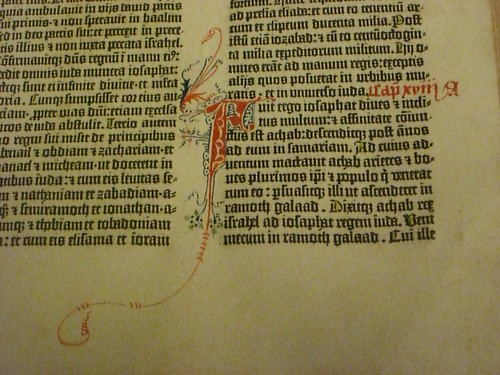
Actually, I have a different question. How far should we take this argument? Here’s an example of the pinnacle of handcrafting:
You can just imagine the scribes with their quills, lapis, gold leaf, and other implements muttering, “That Gutenberg and his noisome fanboys. He can’t even render two colors without our help. Poser. It’ll never last.”
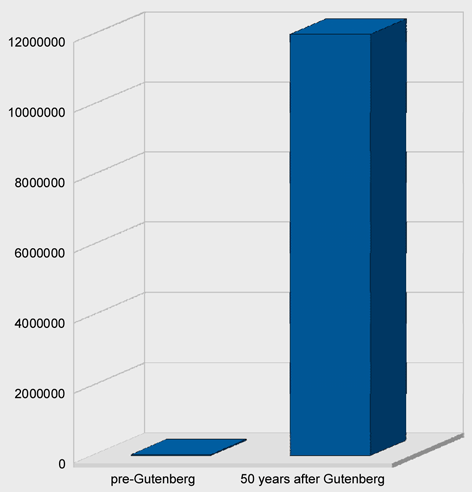
Formatting automation removes cost from the process of creating and delivering content. For technical documents that change often and are perhaps delivered in multiple languages, it removes a lot of cost. Let’s assume that handcrafted pages can improve ease of reading and comprehension with careful copy-fitting and adjusted spacing (Hart’s article mentions “headings, line breaks, intra-word, etc”). This increases the cost of the content.
What happens when content is expensive? Fewer people get to see it.
I think we can all agree that e-books offer none of the typographic sophistication in question here. Bill Gates (yes, that Bill Gates) wrote in 1999:
It is hard to imagine today, but one of the greatest contributions of e-books may eventually be in improving literacy and education in less-developed countries. Today people in poor countries cannot afford to buy books and rarely have access to a library.
Essentially, we can produce documents inexpensively and give more people access to them as a direct result of lower cost, or we can climb on our typographic high horse and whine about word spacing.
Recently I had to write some XSL transforms in which I wanted to ignore the DOCTYPE declarations in the source XML files. In one case, I didn’t have access to the DTD (and the files wouldn’t have validate even if I did). In the other case, the XML files were DITA files, but I had no need or interest in validating the files; I simply needed to run a transform that modified some character data in the files.
In the first case, I ended up writing a couple of SED scripts that removed and re-inserted the DOCTYPE declaration. By the time I encountered the second case, I wanted to do something less ham-fisted, so I started investigating how to direct Saxon to ignore the DOCTYPE declaration.
My first thought was to use the -x switch in Saxon. Perhaps I didn’t use it correctly, but I couldn’t get it to work. Even though I was using a non-validating parser (Piccolo), Saxon kept telling me that the DTD couldn’t be found.
I went back to the drawing board (aka Google) and found a note from Michael Kay that said, “to ignore the DTD completely, you need to use a catalog that redirects the DTD reference to some dummy DTD.” Michael provided a link to a very useful page in the Saxon Wiki that discussed using a catalog with Saxon. After a bit of experimentation, I got it working correctly. In this blog post, I’ve distilled the information to make it useful to others who need to ignore the DOCTYPE in their XSL.
Before I describe the catalog implementation, I’d like to point out a simple solution. This solution works best when a set of XML files are in a single directory and all files use the same DOCTYPE declaration in which the system ID specifies a file:
<!DOCTYPE topic PUBLIC "-//OASIS//DTD DITA Topic//EN" "topic.dtd">
In this case, you don’t need a catalog. It’s easier to create an empty file named “topic.dtd” (a dummy DTD) and save it in the same directory as the XML files. The XML parser looks first for the system ID; if it finds a DTD file, it uses it. Case closed.
However, there are many cases in which this simple solution doesn’t work. The system ID (“topic.dtd” in the previous example) might specify a path that cannot be reproduced on your machine…or the XML files could be spread across multiple directories…or there could be many different DOCTYPEs…or…
In these cases, it makes more sense to set up a catalog file. To specify a catalog with Saxon, you must use the XML Commons Resolver from Apache (resolver.jar). You can download the resolver from SourceForge. The good thing is, if you have the DITA Open Toolkit installed on your machine, you already have a copy of the resolver.jar file. The file is in %DITA-OT%libresolver.jar. You specify the class path for the resolver in the Java command using the -cp switch (shown below).
The resolver requires you to specify a catalog.xml file, in which you map the the public ID (or system ID) in the DOCTYPE declaration to a local DTD file. The catalog.xml file I created looks like this:
Note that the uri attribute in each entry points to a dummy DTD (an empty file). The file path used for the dummy.dtd file is relative to the location of the catalog file.
Putting it all together, I created a DOS batch file to run Java and invoke Saxon:
The Java -cp switch adds class paths for the saxon.jar and resolver.jar files. The -D switch sets the system property xml.catalog.files to the location of the catalog.xml file.
The switches following the Java class (net.sf.saxon.Transform) are Saxon switches.
-r – class of the resolver
-x – class of the source file parser
-y – class of the stylesheet parser
Note, I’m using Windows (DOS) syntax here. If you are using Unix (Linux, Mac), separate the paths in the class path with a colon (:) and use the backslash () as a line continuation character.
When you run Saxon this way, you’ll notice two things: first, Saxon doesn’t complain about the DTD (yay!), but secondly, there is no DOCTYPE declaration in the output. I’ll address how to add the DOCTYPE declaration back to the output XML file in my next blog post.
DITA XML is of little use to readers unless it’s converted to some kind of output. The DITA Open Toolkit (DITA OT) provides transforms and scripts that convert DITA to PDF output and a long list of other formats.
Producing PDF output from DITA content can be challenging. DITA XML is converted to an XSL-FO file, a combination of content and formatting instructions. You must know XSL-FO to customize the PDF, even just to add simple content such as headers and footers, logos, and so on.
To forgo the programming, you can choose a page layout or help authoring tool, but these tools also have pitfalls. Page layout programs have varying degrees of DITA support. Help authoring tools let you style the PDF through CSS, but you can’t fine-tune page layout as you can in page layout programs.
These are just a few examples we discuss in our white paper “Creating PDF files from DITA content.” Read the white paper online (in HTML or PDF).
Unabashed plug warning: The following entry gives a conceptual overview of a solution Scriptorium has implemented for managing trademarks in structured tagging. And we’re proud of it.
You know the problem. According to your style standards, only the first instance of a given trademarked term should display the trademark symbol. Structured documentation allows you to re-use document parts (such as DITA topics) in just about any order you like. In Manual A, the first file containing the trademarked text is, say, Topic A; in Manual B the first file containing the trademarked text is Topic E, which is also used in Manual A. Where do you put your trademark markup, and how do you maintain it when running Manual A and Manual B at approximately the same time?
Maintaining the trademarks by hand adds a level of effort that becomes non-negligible when you start considering a large number of manuals. And the process becomes error prone – those darned human beings. Different writers might tag things different ways, trademarks might escape notice, or markup might be inserted in inappropriate places by accident.
Isn’t this one of those problems that automated documentation was supposed to solve, not create? I once had a professor who said that computers were supposed to handle the work that computers could solve so people could work on the problems that only people can solve.
More than one of Scriptorium’s customers has presented us with this problem, so we know it is not uncommon. We have found a way to deal with the problem in DITA, and we believe that the principle is sufficiently generic to use in non-DITA structures as well.
To begin with, forget conditional processing. It won’t help you with the problem of marking only the first instance of a term. In the example of Manual A, above, setting the condition “Manual A” would still display the trademark in Topic A and Topic E. This is not what your editor wants – and he or she will let you know it in spades if he or she is any kind of editor at all.
Scriptorium’s solution for DITA, in simple outline, is as follows:
Using XSL, go through the ditamaps and remove all trademarking from the document files.
Following a predefined list of trademarked and registered trademarked terms, go through the ditamaps and identify the files that contain each term. Create a temporary file that lists the relevant files in order of book occurrence. (This step prevents having to crawl through the ditamaps more than once.)
Using Perl, iterate through the files listed for each term in the temporary file. Check the occurrence of each instance of the term, in text order, and evaluate whether it is a valid occurrence that requires trademarking. If so, wrap the appropriate trademark markup around it and go to the next trademark. If not, keep going through the text and the list of files until you find a valid occurrence of this trademark.
We possibly could have used XSL instead of Perl for the third step, but Perl’s text manipulation capability is much more robust than XSL’s, so we chose Perl.
In the implementation, the trademarking utility is coordinated by an Ant process. A user runs this utility just before the book is rendered for output. Being in Ant, the trademarking process could probably be integrated into the DITA Open Toolkit build system fairly easily to create a seamless, one-step production process.
There are a number of interesting problems that arise during implementation. For example, in step 3 the process has to evaluate whether the instance of a term is valid for trademarking. Some kinds of non-valid instances of a term in the text might be:
The term is in an indexterm tag.
The term is in an href attribute.
The term is in a title.
The term is in a codeblock tag.
You might also encounter a condition where a trademarked term could be both mixed case and all uppercase. Per your style guide, only the first instance of either should be marked, but not the first instance of both. That sort of requirement makes life just a little more interesting for a coder.
In general, the issue of trademarking first instances is not a simple problem to solve, and variations in style requirements will undoubtedly add complexity and challenges to the problem. But that’s what automated documentation is supposed to be good at, right? So we humans can get back to doing the more difficult problems that only people can solve.
This post is Part 2 of our Flare 5 DITA feature review. Part 1 provides an overview and discusses localization and map files.
Cross-references and other links
I imported DITA content that contained three xref elements (I shortened the IDs below for readability):
Reference to another step in the same topic:
<stepresult>
Result of step. And here’s a reference to the <xref href=”task1.xml#task_8F2F9″ type=”li” format=”dita” scope=”local”>third step</xref>.
</stepresult>
Reference to another topic:
<stepresult>
Result text. And here’s a link to the other task topic:
<xref href=”task2.xml#task_8F2F94 type=”task” format=”dita” scope=”local”></xref>.
</stepresult>
Link to web site:
<cmd>
Here’s another step. Here’s a link with external scope:
<xref href=”https://scriptorium.com” scope=”external” format=”html”>www.scriptorium.com</xref>
</cmd>
All three came across in the WebHelp I generated from Flare:
On the link to the topic, Flare applied a default cross-reference format that included the word “See” and the quotation marks around the topic’s name. You can modify the stylesheet for the Flare project to change that text and styling.
Relationship tables
DITA relationship tables let you avoid the drudgery of manually inserting (and managing!) related topic links. Based on the relationships you specify in the table, related topic links are generated in your output.
I imported a simple map file with a relationship table into Flare and created WebHelp. The output included the links to the related topics. I then tinkered with the project’s stylesheet and its language skin for English to change the default appearance and text of the heading for related concepts. The sentence-style capitalization and red text for “Related concepts” in the following screen shot reflect my modifications:
conrefs
DITA conrefs let you reuse chunks of content. I created a simple conref for a note and then imported the map file with one DITA file that contains the actual note and a second file that references the note via a conref.
Flare happily imported the information and turned the conref into a Flare snippet. It’s worth noting that the referencing, while equivalent, is not the same. In my source DITA files, I had this:
aardvark.xml contains:
<note id=””>Do not feed the animals
Thus, we have two instances of the content in the DITA files — the original content and the content reference. In Flare, we end up with three instances — the snippet and two references to the snippet. In other words, Flare separates out the content being reused into a snippet and then references the snippet. This isn’t necessarily a bad thing, but it’s worth noting.
Specialization
Specialized content is not officially supported at this point. According to MadCap, it worked for some people in testing, but not for others. If you need to publish specialized DITA content through Flare, you might consider generalizing back to standard DITA first.
Conditional processing
When you import DITA content that contains attribute values, Flare creates condition tags based on those values. I imported a map file with a topic that used the audience attribute: one paragraph had that attribute set to user, and another had the attribute set to admin. When I looked in the Project Organizer at the conditions for the WebHelp target, conditions based on my audience values were listed:
I set Audience.admin to Exclude and Audience.user to Include, and then I created WebHelp. As expected, the output included the user-level paragraph and excluded the admin-level one.
DITA support level
Flare supports DITA v1.1.
Our verdict
If you’re looking for a path to browser-based help for your DITA content, you should consider the new version of Flare. Without a lot of effort, we were able to create WebHelp from imported DITA content. Flare handled DITA constructs (such as conrefs and relationship tables) without any problems in our testing. Our only quibble was with the TOC entries in the WebHelp (as mentioned in Part 1), and we’ve heard that MadCap will likely be addressing that issue in the future.
We didn’t evaluate how Flare handles DITA-to-PDF conversion. However, if the PDF process in Flare works as smoothly as the one for WebHelp, Flare could provide a compelling alternative to modifying the XSL-FO templates that come with the Open Toolkit or adopting one of the commercial FO solutions for rendering PDF output.
[Disclosure: Scriptorium is a Certified Flare Instructor.] [Full disclosure: We’re also an Adobe Authorized Training Center, a JustSystems Services Partner, a founding member of TechComm Alliance, a North Carolina corporation, and a woman-owned business. Dog people outnumber cat people in our office. Can I start my post now?]
These days, most of our work uses XML and/or DITA as foundational technologies. As a result, our interest in help authoring tools such as Flare and RoboHelp has been muted. However, with the release of Flare 5, MadCap has added support for DITA. This review looks at the DITA features in the new product. (If you’re looking for a discussion of all the new features, I suggest you wander over to Paul Pehrson’s review. You might also read the official MadCap press release.)
The initial coverage reminds me a bit of this:
(My web site stats prove that you people are suckers for video. Also, I highly recommend TubeChop for extracting a portion of a YouTube video.)
Let’s take a look at the most important Flare/DITA integration pieces.
New output possibilities
After importing DITA content into Flare, you can publish to any of the output formats that Flare supports. Most important, in my opinion, is the option to publish cross-browser, cross-platform HTML-based help (“web help”) because the DITA Open Toolkit does not provide this output. We have created web help systems by customizing the Open Toolkit output, and that approach does make sense in certain situations, but the option to publish through Flare is appealing for several reasons:
Flare provides a default template for web help output (actually, three of them: WebHelp, WebHelp Plus, and WebHelp AIR)
Customizing Flare output is easier than configuring the Open Toolkit
I took some DITA files, opened them in Flare, made some minimal formatting changes, and published to WebHelp. The result is shown here:
Not bad at all for 10 minutes’ work. I added the owl logo and scriptorium.com in the header, changed the default font to sans-serif, and made the heading purple. Tweaking CSS in Flare’s visual editor is straightforward, and changes automatically cascade (sorry) across all the project files.
Ease of configuration
Flare wins. Next topic. (Don’t believe me? Read the DITA Open Toolkit User Guide — actually, just skim the table of contents.)
Language support
The Open Toolkit wins on volume and for right-to-left languages; Flare wins on easy configuration (I’m detecting a theme here.)
Out of the box, both Flare and the Open Toolkit provide strings (that is, localized output for interface elements such as the “Table of Contents” label) for simplified and traditional Chinese, Danish, Dutch, English, Finnish, French, German, Italian, Japanese, Korean, Norwegian, Portugese, Spanish, Swedish, and Thai (I have omitted variations such as Canadian French).
Beyond that, we have the following:
Right-to-left language support: Only in the Open Toolkit
Language strings provided by the Open Toolkit but not by Flare: Arabic, Belarusian, Bulgarian, Catalan, Czech, Greek, Estonian, Hebrew, Croatian, Hungarian, Icelandic, Latvian, Lithuanian, Macedonian, Polish, Romanian, Russian, Slovak, Slovenian, Serbian, Turkish, and Ukrainian
Ease of adding support for a new language: Flare wins. In the Open Toolkit, you modify an XML file; in Flare, you use the Language Skin Editor (although it looks as though you could choose to modify the resource file directory directly if you really wanted to)
Thus, if you need Hebrew or Arabic publishing, you can’t use Flare. The Open Toolkit also provides default support for more languages.
Map files
I imported a map file into Flare and published. Then, I changed the map file to include a simple nested ditamap. Here is what I found:
Flare recognized the map file and the nested map file and built TOC files in Flare with the correct relationships.
Inexplicably, the nested map file was designated the primary TOC. I speculate that this might be because the nested map file was first in alphabetical order. I changed the parent map file to be the primary TOC to fix this. I don’t know what would happen for a more complex set of maps, but I am concerned.
Flare inserted an extra layer into the output TOC where the nested map is found.
The titles generated in the TOC are different in Flare than they are through the DITA Open Toolkit (see below).
I generated the output for my map file (the nested map is the “The decision to implement” section in this screen shot) through the DITA Open Toolkit and got the following XHTML output: Then, I imported the same map file into Flare, generated WebHelp, and got the following TOC output:
Notice that:
The TOC text is different (!!). The DITA Open Toolkit uses the text of the topic titles from inside the topic files. Flare uses the text of the @navtitle attribute in the map file. My topic titles and @navtitles don’t match because I created the map file, then changed a bunch of topic titles. The map file didn’t keep up with the new titles (because it doesn’t matter in the Open Toolkit), but it appears to matter for Flare. The entry in the map file for the first item is:
Full disclosure: We’re an XMetaL Services Provider and have no particular affiliation with oXygen.
I’m in the fortunate situation of having access to both XMetaL 5.5 and oXygen 9.3. Both are excellent XML editors for different reasons. I’d hate for Scriptorium to make me choose one over the other.
From the viewpoint of authoring XML and XSLT, here are my top five features of both editors:
oXygen
Apply XSLT on the fly: You can associate an XML file with an XSLT and transform the XML within oXygen. Goodbye, command line! XMetaL will convert the document to a selected output format. You don’t choose the XSLT–it hasn’t been a big concern for me.
Indented code: The pretty-print option makes working with code so easy. You can set oXygen to do this automatically when you open a file or on demand. The result is code indented according to the structure. XMetaL doesn’t have pretty print.
Autocompleting tags: As you type an element, oXygen pops up a list of elements beginning with the typed string. You press Enter when you find the right tag, and the end tag is inserted for you. The valid attributes at any particular point are also shown in a drop-down list. XMetaL doesn’t have autocompleting tags.
Find/replace in one or more documents: I’ve often needed to search and replace strings in an entire directory. In XMetaL, you can only find and replace in the current document.
Comparing two documents or directories: Compare files by content or timestamp. In a directory, you can even filter by type so only XML files, for example, are compared. XMetaL doesn’t offer this feature.
XMetaL
Auto-tagging content: You can copy and paste content from an unstructured document (a web page, for example), and XMetaL automatically wraps the content in elements. Even tables and lists are wrapped correctly. This can be handy if you have a few documents to convert. In oXygen, the content is pasted as plain text.
Auto-assignment of ID attributes: Never worry about coming up with unique IDs. XMetaL will assign them to the types of elements you select. Warning: The strings are quite long, as in “topic_BBEC2A36C97A4CADB130784380036FD6.” oXygen only inserts IDs on the top-level element but full support will be added in version 10.3.
Auto-insertion of basic elements: When you create a document, XMetaL inserts placeholders for elements such as title, shordesc, body, and p. It’s a small convenience. oXygen will also insert elements if you have Content Completion selected in the Preferences.
WYSIWYG view of tables: The table is displayed as you’d see it in a Word or FrameMaker document. In oXygen, all you see are the table element tags.
Reader-friendly tag view: The tags are a bit easier to read in XMetaL than oXygen. In XMetaL, the opening and closing tags are displayed on one line when possible. This feature saves space on the page and makes the document easier to read in tag view. For example, you might have a short sentence wrapped in p tags. In XMetal, the p tags are displayed on the same line. In oXygen, the p tags are always on separate lines. This is another convenience that doesn’t sound like a big deal, but it really makes a difference while you’re authoring.
oXygen and XMetal have so many other strengths. I’ve just chosen my top five features.
What I’d like to see in XMetaL: The ability to indent code, the ability to drag and drop topics in the map editor.
What’s I’d like to see in oXygen: The ability to view a table–lines and all–in the WYSIWYG view instead of just the element tags.
So how do I choose which editor to use at a particular moment? When I’m casually authoring in XML, I choose XMetaL for all of reasons you read above. The WYSIWYG view is more user-friendly to me. But when I’m writing XSLT or just want to get at the code of an XML document, oXygen is my choice.
Update 6/15/09:
I’m thrilled to report that two deficiencies I reported in oXygen 9 are now supported in the latest version of oXygen — 10.2.
In Author view, tables are now displayed in WYSIWYG format. Just like in your favorite word processor, you can drag and drop column rulings to resize columns. After you resize columns, the colwidth attribute in the colspec element is updated automatically. This is much easier than manually editing the colwidth.
In Author view, the tags are now displayed on one line when possible. Before, the tags were always on separate lines from the content.
I love food. I enjoy cooking and I especially enjoy eating. One of my favorite web sites is epicurious.com, and the kitchen shelf devoted to cookbooks sags alarmingly. Many Saturday mornings, you will find me here.
But I am not happy about how recipes have insinuated themselves into my work life. For some reason, the recipe is the default example of structured content. Look at what happens when you search Google for xml recipe example. Recipes are everywhere, not unlike high fructose corn syrup. Unfortunately, I am not immune to the XML recipe infiltration myself.
I understand the appeal. Recipes are:
highly structured content
well understood
But I think the example is getting a little tired and wilted. Let’s try working with something new. Try out a new kind of lettuce, er, example. This week, I’m trying to write a very basic introduction to structured authoring, and I’m paralyzed by my inability to think of any non-recipe examples.
I’m considering using a glossary as an example. After all, it’s a highly structure piece of content whose organization is well understood. Maybe I’ll use food items as my glossary entries. Baby steps…
PS It’s totally unrelated, but this article about two chefs eating their way through Durham (“nine restaurants in one night, at least five hours of eating and drinking”) is quite fun.
I regret to announce that DocTrain DITA Indianapolis is cancelled. DocTrain/PUBSNET Inc is shutting down.
As a business owner, messages like this strike fear in my heart. If it could happen to them…gulp. (This might be a good time to mention that we are ALWAYS looking for projects, so send them on over, please.) My condolences to the principals at DocTrain.
Meanwhile, I’m also thinking about what we can do in place of the event. I had a couple of presentations scheduled for DocTrain DITA, and Simon Bate was planning a day-long workshop on DITA Open Toolkit configuration.
So, here’s the plan. We are going to offer a couple of webinars based on the sessions we were planning to do at DocTrain DITA:
Each webinar is $20. We may record the webinars and make the recordings available later, but I’m not making any promises. Registration is limited to 50 people.
Here’s the challenge part: If you were scheduled to present at DocTrain DITA (or weren’t but have something useful to say), please set up a webcast of your presentation. It would be ultra-cool if we could replicate the event online (I know that the first week in June was cleared on your schedule!), but let’s get as much of this content as possible available. If you do not have a way to offer a webinar, let me know, and I’ll work with you to host it through Scriptorium.
And here’s my challenge to those of you who like to attend conferences: Please consider supporting these online events. If $20 is truly more than you can afford, contact me.
I’m knee-deep in survey data analysis. With over 600 responses, our recent structured authoring survey was hugely successful–thank you. Many respondents added candid details about their experiences with structured authoring implementation–their fears, mistakes, and biggest surprises.
The survey report will be available later this month (free to participants, $200 for others), but I wanted to give you a couple of preliminary highlights:
About 30 percent of respondents said that they are currently using structured authoring.
There’s a lot of hype around DITA, but our data indicates that it’s backed up by reality. Consider this chart, which shows the top three types of structure (custom, DocBook, or DITA) implemented, being implemented, or planned.
DITA dominates the chart. But it looks as though DITA is additive. That is, it’s not cannibalizing the numbers for DocBook or custom structures. Those numbers are relatively flat. Instead, it looks as though DITA is increasing the total number of implementations.
If you are attending the STC Summit this year, I’m doing a presentation on the survey results on Monday, May 4, at 1:30 p.m., called “The State of Structure.”
The WritePoint staff blog makes a very good point about DITA: it isn’t a magic wand that fixes documentation problems. Also, it’s worth noting that:
… DITA didn’t introduce something completely new. DITA incorporates achievements made in a wide variety of approaches to organizing content that were being proactively conducted starting from 1960’s.
Don’t get me wrong: DITA can be a good solution for many departments that want to set up an XML-based single-sourcing environment. Just don’t expect that a twitch of your nose will convert your legacy content or make the output from the Open Toolkit match your formatting requirements.
I estimate that about 80 percent of our consulting work is XML implementation. And about 80 percent of our XML implementation work is based on DITA. So we spend a lot of time with DITA and the DITA Open Toolkit.
I’m starting to wonder, though, whether the adoption rate of DITA and the DITA Open Toolkit is going to diverge.
For DITA, what we hear most often is that it’s “good enough.” DITA may not be a perfect fit for a customer’s content, but our customer doesn’t see a compelling reason to build the perfect structure. In other words, they are willing to compromise on document structure. DITA structure, even without specialization, offers a reasonable topic-based solution.
But for output, the requirements tend to be much more exacting. Customers want any output to match their established look and feel requirements precisely.
Widespread adoption of DITA leads to a a sort of herd effect with safety in numbers. Not so for the Open Toolkit — output requirements vary widely and people are reluctant to contribute back to the Open Toolkit, perhaps because look and feel is considered proprietary.
The pattern we’re seeing is that customers adopt the Open Toolkit when:
They intend to deploy onto multiple servers, and open source avoids licensing headaches.
The Open Toolkit provides a useful starting point for their output format.
Customers tend to adopt non-Open Toolkit solutions when:
They need attractive PDF. Getting this result from the Open Toolkit isn’t quite impossible, but it’s hard. There are other options that are faster, cheaper, and easier.
They need a format that the Open Toolkit doesn’t provide. The most common requirement here is web-based help. Getting from the XHTML output in the Open Toolkit over to a sophisticated tri-pane help system with table of contents, index, and search….well, let’s just say that it keeps me gainfully employed. AIR is another platform that we need to support.
The software vendors seem to be encouraging this trend. In part, I think they would like to find some way to get lock-in on DITA content. Consider the following:
Adobe FrameMaker can output lovely PDF from DITA content through FrameMaker (no Open Toolkit). You can also use the Open Toolkit to generate formats such as HTML.
ePublisher Pro uses the Open Toolkit under the covers, but provides a GUI that attempts to hide the complexities.
MadCap’s software will support DITA (initially) by importing DITA content and letting you publish through MadCap’s existing publishing engine.
Several other vendors provide support for publishing DITA, but do not use the Open Toolkit at all.
The strategy of supporting DITA structure through a proprietary publishing engine actually makes a lot of sense to me. From a customer point of view, you can:
Set up an XML-based authoring workflow
Manage XML content
It’s not until you’re ready to publish that you move into a proprietary environment.
To me, the interesting question is this: Will the use of proprietary publishing engines be a temporary phenomenon, or will the Open Toolkit eventually displace them in the same way that DITA is displacing custom XML structure?
Have you ever been really scared? I don’t mean just the Halloween kinda scared, but really scared. That’s how I felt at the Burlington Marriott when the hotel employee delivered the box containing the workbooks for my Introduction to XMetaL and DITA workshop. He stood in the doorway, smiled, and handed me a very beat up, bent, folded, spindled, and mutilated FedEx box.
The box looked like the driver had had a flat on Route 128 and used it to prevent the truck from rolling back while jacking up the front end. It was nice and damp too. With much trepidation, I opened the box and — to my relief — found that the materials were undamaged. Whew.
Following that, Wednesday’s all-day workshop on XMetaL and DITA was smooth sailing. OK, we had a bit of a problem with powerstrips, but the helpful DocTrain folks got that taken care of. In retrospect, many of the questions I fielded in the workshop weren’t so much about DITA or XMetaL itself. Instead many of the questions were about generating output. The fact is that unless you’re willing to spend some quality time with CSS and the DITA Open Toolkit, your output from DITA will look very generic. XMetaL has a number of hooks that ease some of the pain in generating XHTML output. But even those hooks won’t save you from FO issues if you want to generate PDF output.
In my presentation on Thursday comparing XMetaL and FrameMaker support in DITA, the questions returned once again to output. Of course, this time the focus was on using FrameMaker 8.0 as a PDF engine. In workflows where content is created and maintained in XML, but then has to be delivered in PDF (or print), FrameMaker 8.0 looks like an attractive possibility. There are a few flaws in this solution (such as translating xref elements for intra-document links into live links in PDF), but users are closer to a solution than they were six months ago.
We’ve posted PDFs of the slides from both sessions on SlideShare.
When you’re done browsing the slides, take a look on our site for information about how we can help you with your FrameMaker, XMetaL, OT, PDF problems.
A recent post on the dita-users Yahoo group asked how to customize the DITA OT stylesheets in view of the fact that there isn’t much documentation available.
From my work customizing and otherwise perverting the DITA OT, I can sympathize with these frustrations. When I started investigating OT customizations, I found many well-crafted tutorials on how to customize and specialize the OT. These were a great starting point, but they only got me so far. In its current state, the documentation is an incomplete jigsaw puzzle; the trees and buildings are filled in nicely, but the sky is still waiting for someone with patience. (Block that metaphor!)
Because there is no documentation available at the individual template level, you need to reconsider the task at hand. I look on it as debugging, decoding, or sleuthing. With that in mind, I find the following to be very useful:
Find a good visual grep-like utility. I use AgentRansack, a free version of FileLocator Pro (it’s free and amazing). This enables me to locate all files that contain a particular class identifier. The visual aspect of the tool allows me to see the context quickly.
Use a programmer’s editor that supports XML and XSL. We use Oxygen. Not only does it help check validity and closes tags automatically, but it also provides a handy sidebar that lists the templates and their modes.
Liberally spread <xsl:comment> or <xsl:message> directives through the stylesheets you’re examining. That helps figure out where you are. Use <xsl:value-of> or <xsl:copy-of> to figure out what you’ve got.
Once you’ve figured out what happens in one of the OT templates, add comments. Now the next time you come back to it, you won’t waste time.
Probably the best form of documentation that the OT could provide here is additional comments in the stylesheets, particularly about the order of processing. I find I add many comments about where to find the template that handles nodes from an <xsl:apply-templates> directive.
One further note. On Tuesday, September 23, I’ll be presenting the third of our “Best Practices in Structured Authoring and Publishing” joint Webinar series with JustSystems. In this presentation I’ll describe a number of approaches you can use to customize DITA OT output. For more information, visit the JustSystems web site.
DITA is a free, pre-made XML document structure. That statement can lead to a few erroneous assumptions: if it’s free, then it will cut down on costs, and if it’s pre-made, it will cut down on labor. There are several things to consider when choosing a DITA solution. Does your staff have the skills to author in a DITA environment? Will additional training be required? Does DITA even match your content model, and if it doesn’t, is it worth the effort to change?
Sarah’s conclusion? “DITA may be free, but it’s not cheap.”
Originally published in STC Intercom, November 2007
XML can benefit a publishing workflow in many ways: improving content reuse, consistency, and potentially automating much of the process. That all sounds wonderful, but XML is not the logical answer for everyone.
Implementing a structured authoring solution requires a significant change from the familiar desktop publishing routine to new tools, technologies, and processes. Switching to XML is going to cost time and money. Depending on your needs, it may not be the most efficient solution.
There are several applications that incorporate features for DITA use, such as XMetal and Altova Authentic, but how much value do they provide? (Looking over the online documentation for XMetal, you will see some pretty shaky formatting and copyfitting.)
There may well be formatting and copyfitting issues. Wouldn’t surprise me at all. But talk about missing the forest for the trees!
DITA/XML/structured authoring are important because they improve how information is stored. To question their value because somebody produced documentation using them that doesn’t look so great…let’s try an analogy:
Last week, I went to a restaurant and the food was terrible. I looked in the kitchen and saw Calphalon pots and pans. I conclude that you should not buy Calphalon because the food they produce is terrible.
The quality of your food is determined by things such as the quality of the ingredients and the skill of the chef. The pan you choose does contribute — it helps to use the right size and a high-quality pan, but to dismiss DITA because one example doesn’t look quite right is pretty much like dismissing Calphalon because somebody once cooked something that didn’t taste very good in it.
PS I like Calphalon. And I have produced my share of problematic entrees.
PPS DITA is not right for everybody.
Another ancient subject that seems to be popping up again is the idea of modular document creation. This is one of those concepts that comes through about once a decade, seduces all the writing managers with the prospect of greater efficiency, takes over entire writing departments for a couple of years, and then falls out of favor as people finally realize that document reuse is not a solvable problem in document delivery but rather an intractable problem in document writing — which is, how to retain any sense of logical connection between pieces of information while writing as if your target audience consisted entirely of people afflicted with ADD.
I don’t think I agree completely, but he does have a point.
I could go on at length about this, but instead I’ll simply leave you with the observation that my personal love affair with modular documentation occurred in 1978 and that I haven’t seen a thing since then that would change the conclusions I reached about it almost thirty years ago. This is not to say that I’m trying to discourage the technical writing community whence I came from their enthusiasm for the modular authoring technology du jour, since engagement in such efforts is virtually guaranteed to buy tech writers a few years in which they can act like software engineers and present themselves as engaged in cutting-edge informational technology development rather than plain old technical writing. That strategy has worked great for some of us.
I think perhaps the arguments for and against single-source publishing are a better place to look. There is a school of thought that argues that single sourcing results in inferior deliverables, both in print and online. But the cost savings from single sourcing are so compelling that nobody really argues for hand-crafting printed and online materials separately any more. (Based on my experience, I think that the quality difference between material that is single sourced (well) and material that is hand-crafted (well) is quite small; perhaps around 10 percent. But that last ten percent is extremely expensive.)
With XML/DITA/modular documentation, there is a similar cost argument. Document reuse and especially localization workflows benefit from modular documentation. For localization teams, getting content in topics rather than monolithic books can result in incremental localization and thus the ability to “sim-ship”; to ship the product in the source language and target languages simultaneously. This, in turn, means a global product launch and a shorter wait for revenue from the markets for which localization is required.
Thus, requirement to accelerate product deliverables and save money on localization (because of more efficient reuse) are going to drive implementation of modular documentation. The argument that non-modular documentation is better documentation will become irrelevant.
To provide the best experiences, we use technologies like cookies to store and/or access device information. Consenting to these technologies will allow us to process data such as browsing behavior or unique IDs on this site. Not consenting or withdrawing consent, may adversely affect certain features and functions.
Functional
Always active
The technical storage or access is strictly necessary for the legitimate purpose of enabling the use of a specific service explicitly requested by the subscriber or user, or for the sole purpose of carrying out the transmission of a communication over an electronic communications network.
Preferences
The technical storage or access is necessary for the legitimate purpose of storing preferences that are not requested by the subscriber or user.
Statistics
The technical storage or access that is used exclusively for statistical purposes.The technical storage or access that is used exclusively for anonymous statistical purposes. Without a subpoena, voluntary compliance on the part of your Internet Service Provider, or additional records from a third party, information stored or retrieved for this purpose alone cannot usually be used to identify you.
Marketing
The technical storage or access is required to create user profiles to send advertising, or to track the user on a website or across several websites for similar marketing purposes.
To provide the best experiences, we use technologies like cookies to store and/or access device information. Consenting to these technologies will allow us to process data such as browsing behavior or unique IDs on this site. Not consenting or withdrawing consent may adversely affect certain features and functions.
Functional
Always active
The technical storage or access is strictly necessary for the legitimate purpose of enabling the use of a specific service explicitly requested by the subscriber or user, or for the sole purpose of carrying out the transmission of a communication over an electronic communications network.
Preferences
The technical storage or access is necessary for the legitimate purpose of storing preferences that are not requested by the subscriber or user.
Statistics
The technical storage or access that is used exclusively for statistical purposes.The technical storage or access that is used exclusively for anonymous statistical purposes. Without a subpoena, voluntary compliance on the part of your Internet Service Provider, or additional records from a third party, information stored or retrieved for this purpose alone cannot usually be used to identify you.
Marketing
The technical storage or access is required to create user profiles to send advertising, or to track the user on a website or across several websites for similar marketing purposes.