Vendor webcast: An overview of authoring DITA with oXygen
In this webcast recording, George Bina shows you how to create DITA content from zero to a full deliverable using oXygen. The full deliverable leads to multiple publishing formats.

In this webcast recording, George Bina shows you how to create DITA content from zero to a full deliverable using oXygen. The full deliverable leads to multiple publishing formats.
Paul Wlodarczyk shows how cloud-based tools like easyDITA can change the way you approach collaboration, and in turn speed your time to publish and simplify your work process.
Have you ever wondered how to effectively manage your DITA content as it continues to grow? Jean-François Ameye shows how IXIASOFT’s full featured DITA CMS solution handles your entire technical documentation process from authoring and searching to reviewing and publishing.
Need some basic metrics on your DITA files? Wondering whether your topics are the right length or not? Check out this new feature in oXygen version 13.
Out of the box, the DITA Open Toolkit (OT) looks like it’s localization-ready. It handles the XML attribute xml:lang. It contains strings for more than 50 localizations. So it would seem that all you have to do is specify the language in your DITA files and maps and you’re good to go…or are you? In this webcast, I’ll discuss some of the issues Scriptorium has encountered while generating localized output from the DITA Open Toolkit—and how we solved them.
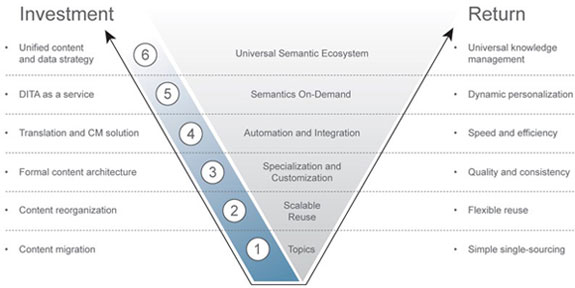
The initial wave of DITA implementations is still building, but we are already seeing the early adopters move on to what I am calling DITA, The Sequel.
In this webcast, Simon Bate provides a “gentle introduction” to the DITA Open Toolkit (OT), the standard way to generate deliverables from DITA documents. This presentation shows how anyone can install the OT. A tour of the contents and how the plugin architecture works is included.
Modifying FrameMaker cross-reference formats: it’s basic and one of the cool things about FrameMaker. But not if you’re editing DITA files using FrameMaker 9 or 10.
Rendering vector images (such as line art or charts) for PDF output through the DITA Open Toolkit can be tricky. You would think that an exported GIF of a vector image would display beautifully in the PDF—but you would be wrong.
I have struggled to understand the keyref and conkeyref features added in DITA 1.2.
It wasn’t until we started applying them to our proposal workflow that I finally understood them. I hope this use case also helps others.